NewPebble now lives inside Intercom, giving your reps the context they need in the tool they're already in.See the integration →

Technical Support Automation

From customer bug report to shipped fix, without looping in engineering.

When a customer reports a bug, Pebble investigates your engineering systems, traces the root cause, drafts a response, and hands your engineers a PR ready to merge, all in under 25 minutes.
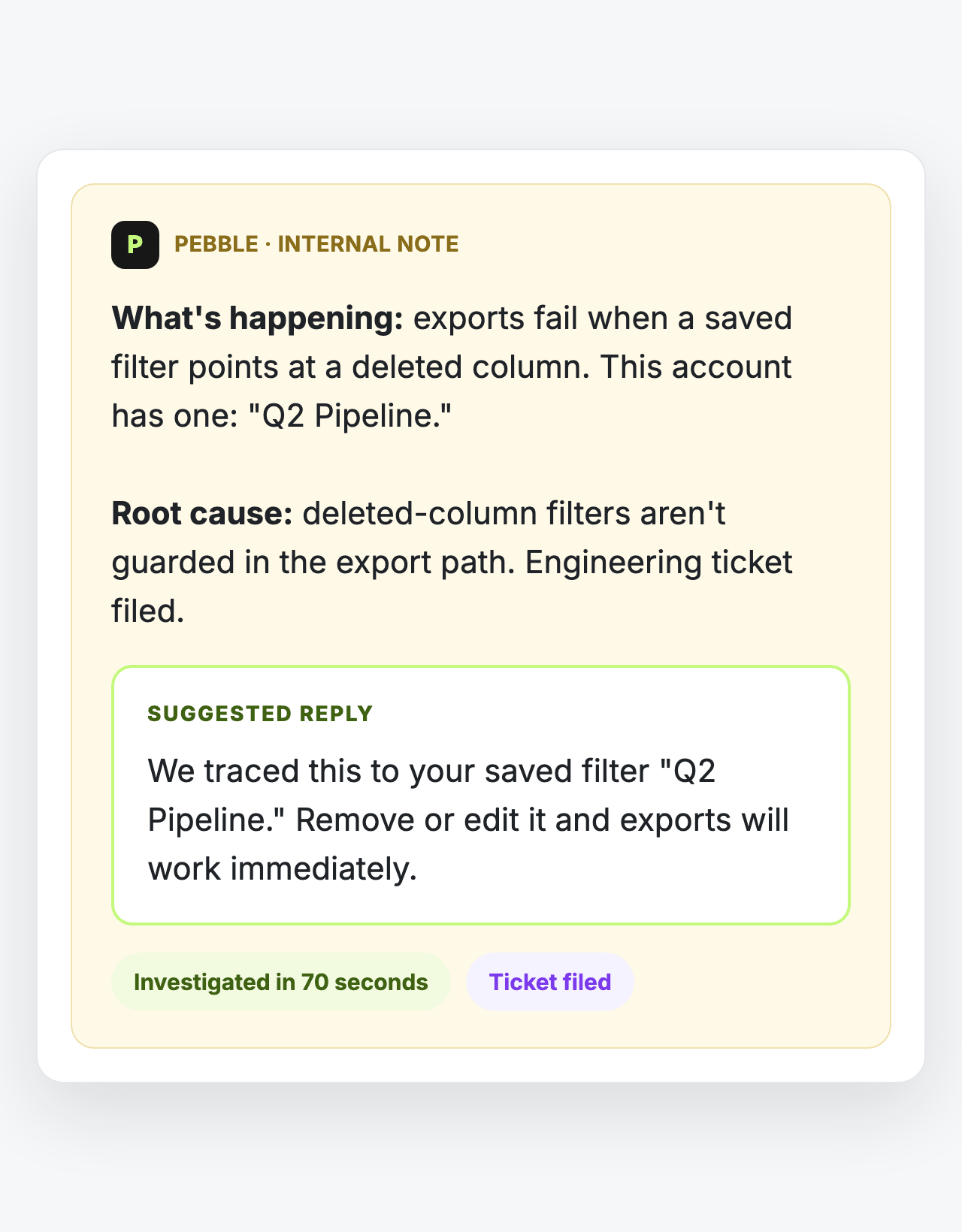

The internal note your rep finds waiting: what's happening, the root cause, and a suggested reply ready to send
Used by support and engineering teams at
GordianFortunafiMyndliftAllFly
HOW IT WORKS

Three steps from bug report to closed ticket.

Step 1 · A ticket lands. When a customer reports a bug in Zendesk, Intercom, or Slack, Pebble picks it up immediately and starts investigating, before anyone has triaged the queue or paged an engineer.
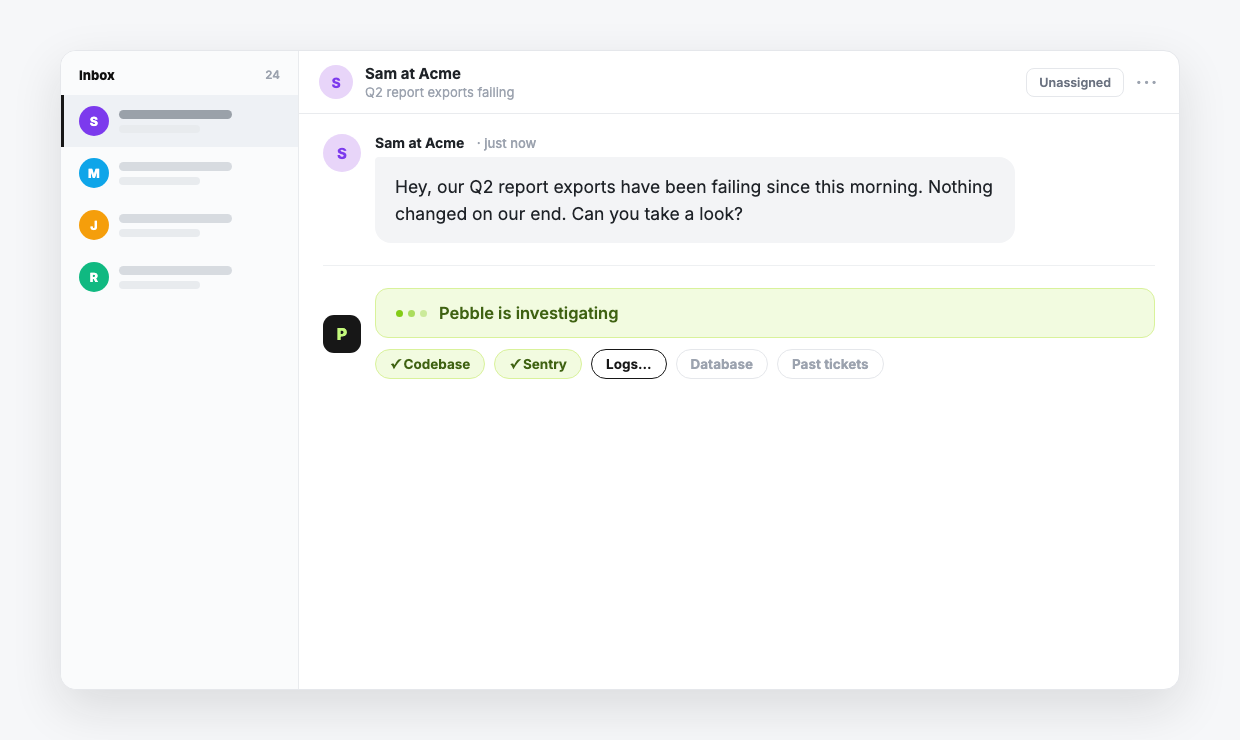
A new customer conversation landing in the inbox, with Pebble already investigating: codebase and Sentry checked, logs in progress
CAPABILITIES

Everything it takes to run those three steps.

Where the diagnosis comes from.

Reads your engineering systems
Codebase, logs, releases, databases: scoped and read-only
Reads errors and stack traces
Straight from production, without giving support production access
Learns from past tickets
Prior resolutions inform new diagnoses
Starts the moment a ticket lands
No triage queue, no assignment
WHAT IT HANDLES

The tickets your support team can't close without engineering.

Most support AI answers questions from your docs. Pebble resolves the tickets that require someone to actually look at your engineering systems: the code, the logs, what changed in the release, the customer's data.

Code bugs reported by customers
Stack traces, unexpected behavior, output that doesn't match what the customer expects. Pebble traces the error to the code path and opens a PR.
Integration and API failures
A customer's integration breaks after a deploy. Pebble checks the auth flow, the relevant API changes, and the customer's config to find the mismatch.
Auth and permissions issues
Account access, role misconfigurations, SSO failures. Pebble identifies the system state and either corrects it directly or hands engineering a precise ticket.
Data inconsistencies
Something in the customer's data looks wrong. Pebble traces it to the source (migration artifact, write conflict, schema mismatch) and proposes the fix.
Configuration drift
A feature that used to work doesn't. Pebble compares current config against expected state and identifies what changed.
Questions in shared Slack channels
A customer or teammate asks how something works. Pebble answers in the channel, grounded in the same systems it investigates, without pulling in an engineer.

If diagnosing it means reading the code, the logs, or the database, it's Pebble's job.

BEYOND THE CODEBASE

Other agents read code. Pebble reaches the whole system.

Reading the codebase is the easy part. Most customer issues take more than code to diagnose, so Pebble connects to the rest of the system:

Codebase
Every repo, scoped and read-only
Production logs
Errors and traces without giving support production access
Databases
Read-only connections to the data behind the ticket
Releases and deploys
What changed, and when
Docs and project management
Linear, Jira, and internal documentation
Customer account state
The config and history behind this customer's issue
INTERNAL ANSWERS

The same engine answers your team's questions.

Not every question is a ticket:

Salespeople get asked how the product handles an edge case.
Customer success needs to know what changed in last week's release.
A new hire wants to understand how billing actually works.

Today those questions interrupt engineering, or they go unanswered. Pebble sits in Slack and answers them from the same systems it investigates, grounded in how the product actually works. Customer-facing teams answer confidently, and new teammates learn the product by asking.
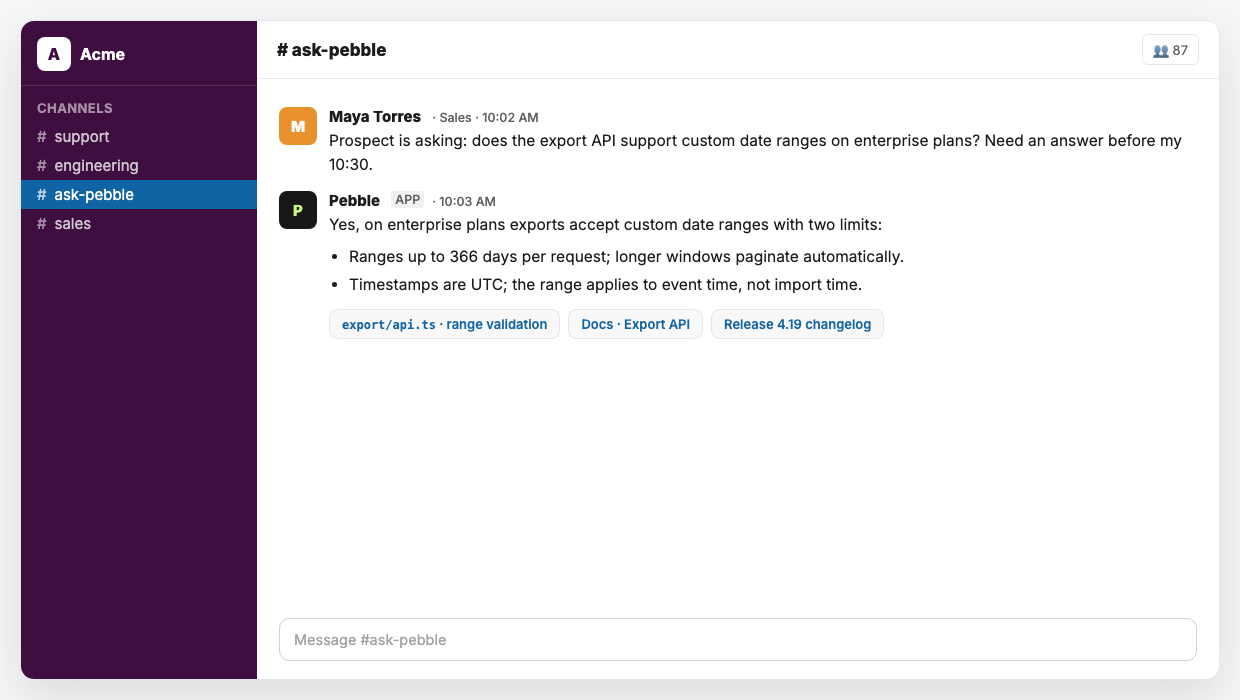
Pebble answering a sales question in Slack with a cited answer: range limits from the export API code, docs, and the release changelog
A real answer, cited to the code, in the channel where the question was asked.
INTEGRATIONS

Works with the tools you already use, live in a day.

Your support team stays in Zendesk or Intercom. Engineering stays in GitHub or GitLab. Pebble works in the gap between them.
CRM
HubSpot*HubSpot*
Salesforce*Salesforce*
Communication
SlackSlack
Microsoft Teams*Microsoft Teams*
Email*Email*
Engineering & DevOps
GitHubGitHub
GitLabGitLab
LinearLinear
JiraJira
CircleCICircleCI
Observability & Data
Datadog*Datadog*
SentrySentry
CloudWatchCloudWatch
GCP LogsGCP Logs
GCP Cloud SQLGCP Cloud SQL

* Coming soon

SOC 2 compliant. Every code change requires human review and approval before it ships. Pebble acts within tightly scoped access your team configures, and every action is logged.

WHO IT'S FOR

Built for B2B SaaS companies with technical products and dedicated support teams.

Support leaders
You're managing escalations to engineering that take days to resolve. Pebble reduces that backlog without adding headcount, and you get visibility into what's happening and why.
Support engineers and agents
You're triaging and responding. With Pebble, technical tickets that used to require engineering context come back to you with a diagnosis and a draft. You close more and wait less.
Engineering teams
Escalations that used to eat 30% of engineering time get resolved before they reach you. The ones that still do arrive with root cause, repro steps, and an open PR.
HOW IT GETS BETTER

Week 4 is faster than week 1, because it learns your stack.

Pebble builds a persistent understanding of your codebase, your ticket patterns, and how your team resolves issues. The more it processes, the more accurate it gets.

Early PRs go through rounds of engineer feedback while Pebble learns your review standards. Within weeks it submits merge-ready code on the first attempt. Backlogs that once required dedicated sprints clear continuously. Fixes that used to wait weeks ship the week they're reported.

FAQ

Questions we hear on every call.

See it resolve a real ticket

We'll walk you through a technical escalation end-to-end: diagnosis in under 5 minutes, a fix ready in under 25, ticket closed without paging engineering.